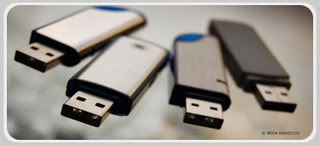
For this trick, in flash (autorun.inf usually lodged in the flash) to be made a folder with the name autorun.inf of our own making.
The logic of this autorun.inf is a file name that contains the program while a file name will not be made if existing folders with the same name.
Steps to create the autorun.inf folder to the file blocks as follows:
1. Create a file named autorun.inf on your computer desktop, by right clicking your mouse, then click "new text" leave blank
2.Move with "CUT" or "Ctrl X" autorun.inf file that you created into flash .. but before "paste"into the flash created a folder on your desktop? autorun.inf rename it (right click and click "new folder"? give the name autorun.inf) -
3. Replace the autorun.inf file (virus) that is in flash with autorun.inf file you made. With the "paste" the file you made earlier
4. Quickly remove the autorun.inf file you say? enter the autorun.inf folder into the flash with "copy" and then "paste"
If this is successful the file / virus autorun.inf will never again interfere with the flash from her will be block by the name of the same folder.
This also applies to similar files in the flash that often ride like etc dream.html no.com.
The virus is often detected by antivirus software by name or W32Sality.AE Sality this is that many viruses are spread through a network that uses windows default share folder or share with full access. Sality virus will attack and inject a lot of files ending in *. exe, disable the task manager, disable Regedit and make your windows can not run in save mode. And worse, this Sality able to destroy some files ending in *. exe to not be used again. To remove it automatically, you can update the antivirus software you use and do scanning and repair thoroughly. But if your antivirus does not solve this sality virus attack, then you can delete them manually. How to eradicate the virus W32Sality.AE or more often known by the name of this sality virus manually from your computer? I give the following tips and how to eradicate the virus without mercy and guarantees 99% success!
1. Disconnect your computer from any network, whether LAN or the Internet.
2. Turn off system restore feature you during the process of cleaning the virus sality
3. Download here Sality Repair
4. Extract the file and right click the file SalityRepair repair.inf then right click and click Install
5. Turn off all active applications and are you open
6. Download Norman Malware Cleaner here or download directly here
7. Norman Malware Cleaner Change the extension from. exe to. cmd for application Norman Malware Cleaner is not infected by the virus sality
8. Perform scanning using Norman Malware Cleaner.cmd (extension. exe is your change to. cmd)
9. Restart your computer after the cleaning process is complete
10. Download FixReg here
11. Extrack FixReg.rar and run the registry that is in the folder FixReg
in accordance with windows that you use.
12. Restart your computer.
13. Check task manager regedit, etc. to ensure your computer has been recovered. You can also scan in safe mode to make sure your computer is correct - really clean from the virus sality.
Actually, almost all antivirus can detect and eradicate this virus sality. You can update your antivirus and do the scanning and repair using the antivirus you use. If your antivirus was not able to delete it, then tips it manually eradicate the virus sality above could be a powerful solution free from attack W32Sality.AE
Have you ever accidentally delete your files, then have to empty the recycle bin? Or you have to format the hard disk but want your data back? Or data lost or corrupted due to virus? Or because the computer shut down or restart all of a sudden? There is a way to restore lost data, ie with a very complete software, namely Ontrack EasyRecovery Professional. These are the ways to restore your lost data.
First you have to first download the software, please click here to download software Ontrack EasyRecovery Professional.
If you are missing data on drive C:, you should install on your computer or other operating systems. If data are missing on drive other than C:, you can install this software anywhere on the same computer, provided that is not in greeting one drive with lost data earlier.
This software provides a solution which is very comprehensive in connection with lost data or business recovery data lost due to:
1. Viruses.
2. Sectors that are not legible
3. Application errors, system, or shut down abnormally.
4. Damage to critical areas.
5. Ter-format
6. Other possible causes of data loss.
This software is installed on Windows 98 SE, Me, 2000, or XP, and able to recover data for windows on all systems. This software has four main features, namely:
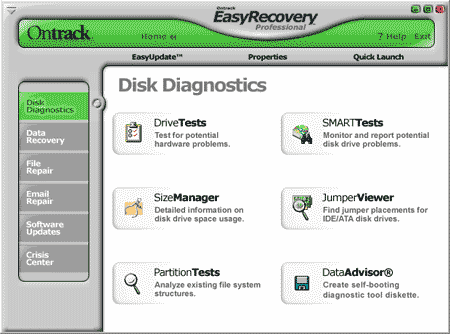
1. Disk Diagnostics, which is a tool to check the condition of your hard drive is still good or not.
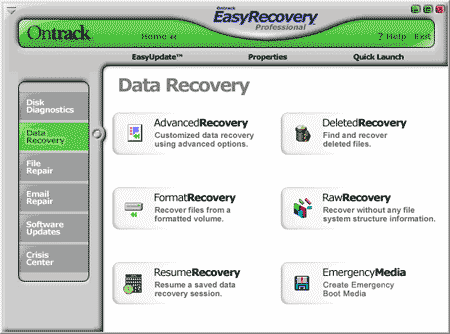
2. Data Recovery, which is a tool to recover data / files due to deletion, formatted, and so forth.
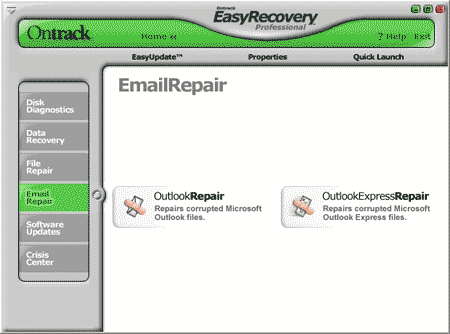
3. Email Repair, which is a tool to restore your Outlook Express data is erased or damaged.
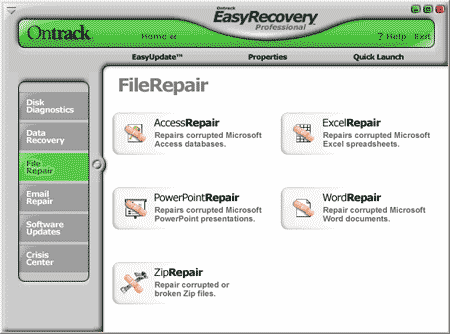
4. Repair files, which is a tool to improve data / files of Microsoft Word, Excel, Access, PowerPoint, and ZIP (WinZip) file that is damaged due to virus or other reasons.
Let us look at one at the existing facilities within this software.
1. Disk Diagnostics
Tool is in Disk Diagnostics are:
* Data Advisor, to make a recovery diskette.
* Drive Tests, to test the physical condition of the hard disk (disk drive).
* Jumper Viewer, to view the position of the jumpers on the hard disk.
* Partition Tests, to check the condition of disk partition.
* Size Manager, to see the hard disk capacity
* SMART tests, used to test the condition of Self-Monitoring, Analysis and Reporting Technology on a hard drive.
2. Data Recovery
Tools that exist in the Data Recovery are:
* Advanced Recovery, to find data that can not recover with another tool, namely because it was the format, including partitions, viruses, or anything else.
* Deleted Recovery, to search for deleted data. This is the tool most frequently used author.
* Format Recovery, to find data on the hard disk has been format.
* Raw Recovery, to search for the missing files based on signatures.
* Resume Recovery, all the recovery process can be paused and resumed at a later time.
* Emergency Media, to create a floppy disk or CD that is used to recover data / files missing.
3. Email Repair, used to restore your Outlook data and Outlook Express are missing.
4. Repair files, used to restore the files of Microsoft Office and ZIP damaged. This tool can fix the file Microsoft Word, Excel, Access, PowerPoint, and ZIP (WinZip) file is corrupted or damaged due to virus or other reasons.
The data file is missing or more difficult to recover if:
1. You add new files after you delete or format the hard disk.
2. You use FAT32 in Windows XP.
So how to restore the lost data with EasyRecovery Professional software. Hopefully your data can be saved.
It can be cool and useful info! Software (1GB_to_2GB) that can change the FlashDisk 1GB to 2GB. And now I want to-for to you, the way is.................
Immediately wrote yes, here it is how:
1) software download HERE (212KB).
2) Open the software you've downloaded earlier.
3) Meanwhile, the plug flashdiskmu to Computer / Laptop.
4) In the software, click refresh. then click fix.
5) Wait until finished, then pull the plug again flashdiskmu continue.
6) To check the added capacity of flash (from 1GB to 2GB). Right-click on the flash memory is readable, and select Properties. And you can see his Capacity (total capacity) increases.
But, because the price of the day Flash Disk, the more expensive course. You'd better buy a new one (which is 4GB, only about one hundred thousand dollars ...).
Good luck, Good Success, and Good Work! :)